Archive · This post is from a previous era of this site.
Don't clone your PHP objects, DeepCopy them
Disclaimer: The intent of this blog post is not for you to stop using the clone keyword but to raise awareness of its behavior since IMO in the documentation is not that clear.
As you know, PHP has a well-known clone keyword that shallow copies all of the object’s properties. So under the hood what it does is to create a new Object with the exact same values of that object’s properties — unless you change its behavior by implementing the __clone() function in your class.
This behavior seems what we expected. However, it might give “weird” results if the object that you are cloning contains properties that are objects. Let’s see:
<?php

final class Car {
    public $model; // making them public to write less code

    public function __construct(CarModel $model) {
        $this->model = $model;
    }
}

final class CarModel {
    public $name;
    public $year;

    public function __construct($name, $year) {
        $this->name = $name;
        $this->year = $year;
    }
}
So these are two simple classes, one for my Car another for its Model. So now let’s see what happens when we create a new Car, clone it and change a model name of one of them.
<?php

$bmwX1 = new Car(new CarModel('X1', 2015));
$bmwX5 = clone $bmwX1;

var_dump(spl_object_hash($bmwX1)); // "0000000037e353af0000558c268309ea"
var_dump(spl_object_hash($bmwX5)); // "0000000037e353ac0000558c268309ea"

// So far all good, two objects with different ids.
// Let's see what happens to the model property in those objects

var_dump(spl_object_hash($bmwX1->model)); // "0000000037e353ad0000558c268309ea"
var_dump(spl_object_hash($bmwX5->model)); // "0000000037e353ad0000558c268309ea"

// As you can see the Model object in both objects has the same Id.
// This means if I change the model name in one of the objects it will be reflected in both.

$bmwX5->model->name = 'X5';

var_dump($bmwX1->model);

// object(CarModel)#2 (2) {
//   ["name"]=> "X5"
//   ["year"]=> int(2015)
// }

var_dump($bmwX5->model);

// object(CarModel)#2 (2) {
//   ["name"]=> "X5"
//   ["year"]=> int(2015)
// }
Would you expect this result? Probably not. So what’s happening here? PHP does not regenerate the memory address of objects that are properties in the object you are cloning nor traverses those properties to regenerate them.
So how can we solve this? Fortunately, there is a Library for it! The DeepCopy lib is what we need. What DeepCopy does is recursively traverse all the object’s properties and clone them ensuring that every object inside the object you are cloning has a new instance of it — hence it will have a new object Id.
| Clone | DeepCopy |
|---|---|
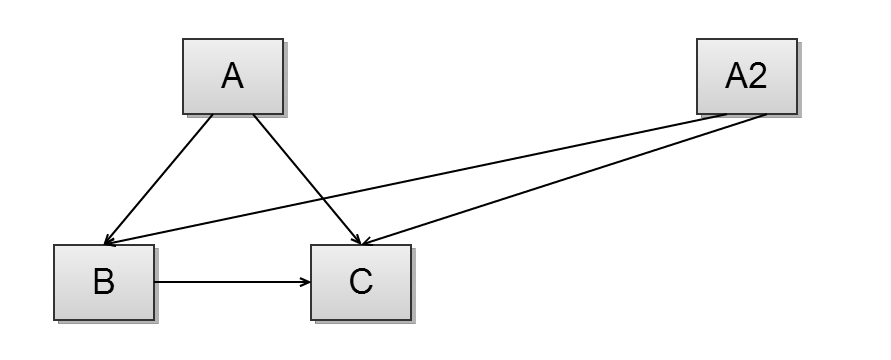 | 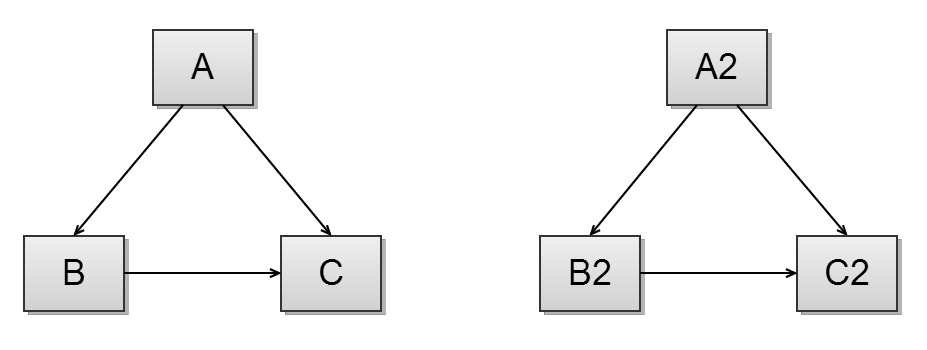 |
Let’s see how we can fix the code:
<?php

use function DeepCopy\deep_copy;

$bmwX1 = new Car(new CarModel('X1', 2015));
$bmwX5 = deep_copy($bmwX1);

var_dump(spl_object_hash($bmwX1->model)); // "000000006042b54c000000001a8ebc46"
var_dump(spl_object_hash($bmwX5->model)); // "000000006042b543000000001a8ebc46"

// Now we have two different objects ids for the Model object in both objects bmwX1 and bmwX5.

$bmwX5->model->name = 'X5';

var_dump($bmwX1->model);

// object(CarModel)#1 (2) {
//   ["name"]=> string(2) "X1"
//   ["year"]=> int(2015)
// }

var_dump($bmwX5->model);

// object(CarModel)#3 (2) {
//   ["name"]=> string(2) "X5"
//   ["year"]=> int(2015)
// }
Now each object has its own model with independent state. The DeepCopy library is available on Packagist and is already a dependency of PHPUnit.